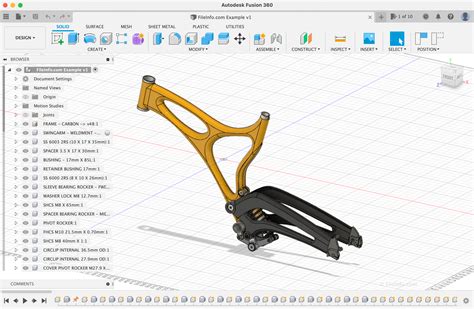
Autodesk Fusion 360
Overview
Autodesk Fusion 360 is an advanced CAD, CAM, and CAE tool that merges design, engineering, and manufacturing in a single platform. It empowers users to create, iterate, and collaborate on 3D models and simulations seamlessly across different devices, making it an essential software for engineers, product designers, and makers.
Key Features
- 3D Modeling: Create precise 3D models using a wide range of tools for sketching, sculpting, and parametric design.
- Simulation: Test your designs under real-world conditions with integrated simulation tools to ensure durability and performance.
- CAM Integration: Generate toolpaths for CNC machining directly within the platform, optimizing your manufacturing process.
- Collaboration: Share your projects easily with team members and stakeholders, enabling real-time feedback and collaboration on designs.
- Cloud-Based Access: Access your projects from anywhere, on any device, thanks to the cloud-powered nature of Fusion 360.
Who Should Use It?
Autodesk Fusion 360 is ideal for engineers, designers, and hobbyists who are involved in product design and development. Whether you are creating consumer products, automotive parts, or intricate mechanical systems, Fusion 360 provides the necessary tools to bring your ideas to life.
System Requirements
To use Autodesk Fusion 360 effectively, ensure your computer meets the following minimum system requirements:
- Operating System: Windows 10 (64-bit) or macOS Mojave (10.14) or later
- RAM: 4 GB minimum; 8 GB or more is recommended
- Graphics: DirectX 11 compatible graphics card with 1 GB video memory
- Storage: 3 GB of free disk space for installation
Conclusion
Autodesk Fusion 360 is a powerful tool that integrates design, engineering, and manufacturing processes into a single, robust platform. Whether you’re a professional or a hobbyist, this software is designed to enhance your creative workflow and ensure that your projects succeed.
Leave a Reply