Free Download RoboCopy GUI
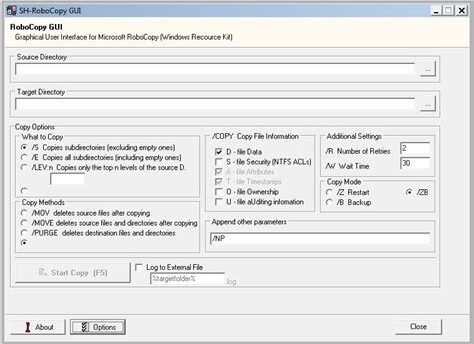
RoboCopy GUI is an intuitive graphical user interface for the powerful command-line utility Robocopy, designed for Windows users who wish to effortlessly manage file and folder copying tasks. Whether you need to back up your data, synchronize directories, or perform bulk file transfers, RoboCopy GUI simplifies the process with user-friendly controls and visual aids.
Key Features
- Easy-to-Use Interface: Navigate through complex copy tasks with a straightforward GUI that makes Robocopy accessible to everyone.
- Folder Synchronization: Ensure that your files are always up-to-date by using the synchronize option to match source and destination directories.
- Customizable Options: Leverage the full power of Robocopy by configuring various options such as copy modes, retry settings, and file masks.
- Progress Monitoring: Track the status of file transfers in real-time with clear progress indicators, making it easy to see how much data has been copied.
- Logging Capabilities: Generate log files to keep a detailed record of your copy operations, useful for auditing and troubleshooting.
- Multi-Threaded Copies: Take advantage of multi-threading to greatly speed up file transfer processes, especially when handling large datasets.
Whether you are a home user looking to back up your important files or an IT professional managing extensive data migrations, RoboCopy GUI is the perfect tool to simplify and enhance your file management tasks.
Leave a Reply