TCP Optimizer
Overview
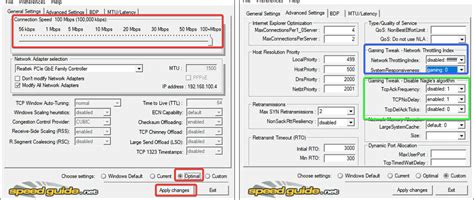
TCP Optimizer is a free, Windows-based program designed to optimize and tune your Internet connection settings for enhanced speed and performance. It combines a user-friendly interface with advanced features, allowing both novice and expert users to achieve optimal network performance without diving into complex configuration menus.
Key Features
- Easy-to-Use Interface: The intuitive interface makes it simple for users to navigate through settings and adjustments.
- Automatic Configuration: Offers preset settings for various Internet connection types, facilitating quick optimization.
- Manual Adjustments: For advanced users, TCP Optimizer allows manual tweaks to TCP/IP settings for customized performance.
- Backup and Restore: Secure your configurations with built-in backup and restore options, ensuring that changes can be reverted if needed.
- Detailed Statistics: View live connection statistics to monitor improvements and analyze performance changes.
System Requirements
TCP Optimizer is compatible with various Windows operating systems, ensuring broad accessibility for users seeking to enhance their Internet speed and reliability.
Conclusion
Whether you’re experiencing slow Internet speeds or just want to ensure your connection is as fast as possible, TCP Optimizer is an essential tool for optimizing your network settings and fully unleashing the potential of your Internet connection.
Leave a Reply